ZIO-Temporal Activities
In the HelloWorld example we built earlier, the Workflow that returns a greeting is purely functional because it is deterministic and is free from side-effects. The output is completely determined by the input: if the input is "Alice" then the output will be "Hello Alice!" every time, and executing it has no effect on the world outside of the Temporal system.
But most Workflows are non-deterministic. If you are building a microservice that must communicate with other services and then behave depending on that communication, then a Workflow that includes such communication and behavior will be non-deterministic. Such a Workflow is functional in the sense that it has input and output values, but it also has the side-effect of communicating with the outside world, thus it is impure. That communication is not only determining the output value of the Workflow, but it is also affecting the outside-world in ways that may be unknowable simply by looking at the Workflow code.
Because Tasks that have side-effects are different from purely deterministic Workflow Tasks, ZIO-Temporal provides a different mechanism for accomplishing them: Activities. Activity Tasks are declared, implemented, and used in a manner somewhat similar to Workflow Tasks, but we keep them separate and use them a bit differently. We will see this now in a small example.
When to Use An Activity
An application that can communicate with other services can provide more features to its users by accessing the APIs of those other services to add value to the program. As a very simple project, we will now create an application to provide life guidance to users by answering their yes-or-no questions.
We could do this with a random number generator that serves as a digital coin flip, but we want to provide high-quality answers. We will therefore use the API of a service that provides answers in the form of a "yes" or a "no", called YesNo.wtf (online as of September 2024). You can view responses in your web browser, but it also has an API for programmatic access.
The URL for the API is https://yesno.wtf/api. If you pass that URL as the argument to the shell command curl then you will see the form of the value it returns. Here is an example from one run:
$ curl https://yesno.wtf/api
{"answer":"yes","forced":false,"image":"https://yesno.wtf/assets/yes/13-c3082a998e7758be8e582276f35d1336.gif"}
More prettily formatted, the value returned was:
{
  "answer": "yes",
  "forced": false,
  "image":  "https://yesno.wtf/assets/yes/13-c3082a998e7758be8e582276f35d1336.gif"
}
That is the output we saw when we ran it. If you run it yourself then you will probably get a different result, and run again another result still because it is non-deterministic. The result is a JSON object that always has the same form but an unpredictable value. It has three properties but we only need the first, named "answer", whose value is always either "yes" or "no".
We can create a Temporal Activity to do programmatically the same thing as this curl command. Further, we can use the ZIO-JSON facility to extract the "answer" value out of the JSON contained in the response body.
In the previous section we wrote a program that takes a person’s name and favorite thing as input, and prints output containing the name and the thing. We can use a similar pattern here. We will modify that program, on the input side replacing the favorite thing with a question, and on the output side replacing the favorite thing with the answer to that question. We will obtain that answer by using the yesno.wtf API. This new program will be able to provide an answer for any yes-or-no question we can think of.
If you open the Scala REPL using the sbt console command from the project folder, then you can try doing this interactively.
The Scala standard library’s Source object provides several methods for creating representations of data sources. One of those methods is fromURL(), which returns a Source instance whose mkString method returns a string representation of the resource found at a given URL. You can see this by evaluating the following expression in the REPL console:
scala> scala.io.Source.fromURL("https://yesno.wtf/api").mkString
val res0: String = {"answer":"no","forced":false,"image":"https://yesno.wtf/assets/no/23-5fe6c1ca6c78e7bf9a7cf43e406fb8db.gif"}
This returned a String that looks like the output from the curl command above. To convert this String into a more useful Scala type, we can define such a type, and then generate a decoder for it using ZIO-JSON. The type definition corresponds to the structure of the JSON object returned from an API request:
scala> case class YesOrNo(answer: String, forced: Boolean, image: String)
     |
// defined case class YesOrNo
Now, using ZIO-JSON, derive the decoder for this new YesOrNo type:
scala> import zio.json.*

scala> given JsonDecoder[YesOrNo] = DeriveJsonDecoder.gen[YesOrNo]
lazy val given_JsonDecoder_YesOrNo: zio.json.JsonDecoder[YesOrNo]
Note: You may see a warning in the REPL that the
importis unused. You can safely ignore it.
The given keyword here is defining a value, but rather than binding the value to a variable name that we provide, Scala puts the value into the current context so that it is accessible implicitly without being named. ZIO-JSON provides the method fromJson[], which will look in the context to find a decoder for the type of its parameter when invoked. If it finds that decoder and can decode the String to which it is applied, then it will return the decoded instance of its type parameter. If it fails then it will return a String containing an error message. Thus, fromJson[YesOrNo] will return either a String (indicating an error) or a YesOrNo (upon success).
fromJson[] is a method of the DecoderOps class, and the Scala compiler will implicitly convert a String value to a DecoderOps in a context where the requested decoder is available. Therefore, where the context contains the decoder, fromJson[] can be invoked on a String value as if it were a method in the String class. For example, we can invoke fromJson[] on the string that the curl command displayed earlier:
scala> """{"answer":"yes","forced":false,"image":"https://yesno.wtf/assets/yes/13-c3082a998e7758be8e582276f35d1336.gif"}""".fromJson[YesOrNo]
val res1: Either[String, YesOrNo] = Right(YesOrNo(yes,false,https://yesno.wtf/assets/yes/13-c3082a998e7758be8e582276f35d1336.gif))
See that the type returned by fromJson[YesOrNo] is Either[String, YesOrNo], which indicates that whatever the value is, it is either a String or a YesOrNo, but nothing else. Scala is an object oriented language, and Either[A, B] is the supertype of Left[A, B] and Right[A, B] and of nothing else. If it is a Left[A, B] then it contains a value of type A. If it is a Right[A, B] then it contains a B.
This expression shown here returned a value of type Either[String, YesOrNo], so the value will be either a Left[String, YesOrNo] containing an error-message string, or a Right[String, YesOrNo] containing the YesOrNo that was decoded as JSON. This application of fromJson[] was to a String literal value, but we can also apply it to the String value returned from an API request:
scala> scala.io.Source.fromURL("https://yesno.wtf/api").mkString.fromJson[YesOrNo]
val res2: Either[String, YesOrNo] = Right(YesOrNo(no,false,https://yesno.wtf/assets/no/14-cb78bf7104f848794808d61b9cd83eba.gif))
We want to act according to whether the decoding is successful or not, defining a sensible action in case of failure. A Scala match expression can destructure a Left or a Right, and extract the contents to be returned:
scala.io.Source.fromURL("https://yesno.wtf/api").mkString.fromJson[YesOrNo] match
      case Left(_)                      => "unavailable"
      case Right(YesOrNo(answer, _, _)) => answer
The expression to the left of the match keyword is evaluated, and that value is compared to the following patterns until a match is found. When one pattern matches, the code to the right of the => is evaluated and the result returned. If you paste this expression into the REPL (after deriving the JSON decoder), then you should get a String value of "yes" or "no", unwrapped from the Either that was returned by the decoder.
This example is making a network connection to the yesno.wtf public API, requesting an answer as a JSON-formatted string, attempting to decode that string into an instance of our custom YesOrNo type, matching on the value returned by fromJson[], and then, if decoding was successful, returning the answer value member of that instance.
That was the hard part. Now we can turn this expression into a ZIO-Temporal application by dropping it into our existing program. Because this code has the non-deterministic side-effect of communicating with the outside world, it must be defined as an Activity, which requires a trait and an implementing class.
Declare an Activity
We already learned how to define a Workflow, and defining an Activity is similar. One difference is that while a Workflow trait declares only a single Workflow method, an Activity trait can declare as many Activity methods as it needs. These Activity methods can only be executed as part of Workflows. For example, we can define a Workflow named AnswerQuestion whose Workflow method will use an Activity named GetAnswer. First we declare the traits and methods:
@workflowInterface trait AnswerQuestion:
  @workflowMethod def apply(question: Question): String

@activityInterface trait QuestionActivity:
  def getAnswer(): String
The Workflow trait and the Workflow method are annotated as we have seen before. The Activity trait is annotated with @activityInterface. Although the parentheses after getAnswer() are not strictly necessary because the method has no value parameters, we include them here to emphasize to human readers that this is a method with side-effects.
The type of a Workflow is the name of its trait type. This is possible because a Workflow has only one Workflow method, which is the method that starts the Workflow Execution when invoked. A Workflow can have multiple methods, but only one of them is the “Workflow method”. If you know the Workflow type then you can determine the Workflow method.
Activities are different because an Activity trait can declare multiple Activity methods, each representing a separate Activity. Therefore the type of an Activity is the name of its method capitalized, rather than the name of the trait that declares that method. In the example above, the type of the Workflow is AnswerQuestion and the type of the Activity is GetAnswer. These names are used in diagnostic output and in the Temporal management web GUI.
Our main program can execute a Workflow as we have already done, but it must not directly execute an Activity. An Activity is executed from within a Workflow. Here is an implementation of the AnswerQuestion Workflow trait declared above, showing how the Workflow method can execute the Activity method:
class AnswerQuestionImpl extends AnswerQuestion:
  override def apply(question: Question) =
    val answer = ZActivityStub.execute(activities.getAnswer())
    s"Hello ${question.name}. You asked, “${question.text}” The answer is $answer."

class QuestionActivityImpl extends QuestionActivity:
  override def getAnswer() = ???
In the previous section we learned how to use a single custom Scala type as the input parameter to a Workflow, and here we are using one called Question. If we define Question as follows, then we can use the name and text fields as input data for the Workflow, and include them in the Workflow return value.
case class Question(name: String, text: String)
In an earlier section, we started a Workflow Execution by invoking
ZWorkflowStub.execute(helloWorld(name))
The instruction to start the Activity here is similar, where we invoke:
ZActivityStub.execute(activities.getAnswer())
Here, activities is an instance of the Activity trait QuestionActivity but it is not an instance of our implementation of that trait QuestionActivityImpl. Rather it is an instance of a dynamically-generated proxy class created by the Java Reflection API. That proxy class implements our trait QuestionActivity.
Similar to when we obtained a proxy stub for the Workflow object, activities here is also a proxy stub. Invoking the getAnswer() method on activities will start the Temporal process by adding to the Temporal Server Task Queue a command to start the GetAnswer Activity. A Worker will dequeue that command and start working on it. When the Activity completes, the Worker sends the return value back to the Temporal Server, and the Server returns that value to our method invocation as if it had been invoked on an instance of QuestionActivityImpl. The Server also persists this value, so if this Workflow needs to be replayed then the saved value will be used instead of making another network request. This could happen, for example, if the machine running the Workflow crashes before receiving the result of the Activity.
In an earlier section we saw how to obtain the Workflow proxy stub using ZWorkflowClient.newWorkflowStub[](), specifying the Workflow type and options. Here, we obtain the Activity proxy stub using ZWorkflow.newActivityStub[]().
val activities = ZWorkflow.newActivityStub[QuestionActivity]:
  ZActivityOptions.withStartToCloseTimeout(60.seconds)
In order to acquire an Activity proxy stub, you must configure a timeout value, here set to a maximum of sixty seconds for a single attempt of the Activity. If there are multiple retries, then the total time for the Activity to complete may exceed this single-attempt maximum.
Register an Activity
A similarity between Workflows and Activities is that both must be registered with a Worker for that Worker to accept and work on them. A difference here is that Workflows are registered by type, while Activities are registered by instance value. We have seen how to register a workflow using the ZWorker.addWorkflow[] method. To register our Activity we will use the ZWorker.addActivityImplementation() method.
When registering a Workflow, the addWorkflow[] method takes a type parameter: the type of the Workflow being registered. But when registering an Activity, the addActivityImplementation() method takes a value parameter, and that value is an instance of the Activity implementation class. For example, here our Activity implementation class is QuestionActivityImpl, so we can use the following to register the Activity with a Worker.
ZWorker.addActivityImplementation(new QuestionActivityImpl)
Same as for addWorkflow[], the addActivityImplementation() method returns an aspect that can be applied to a ZIO effect. As we saw before, we apply an aspect to a ZIO using the apply-aspect operator @@. This operator returns a ZIO and so can be chained with the other aspect like this:
ZWorkerFactory.newWorker("question-queue")
  @@ ZWorker.addWorkflow[AnswerQuestionImpl].fromClass
  @@ ZWorker.addActivityImplementation(new QuestionActivityImpl)
This expression, when evaluated, will return a ZIO effect containing a ZWorker instance configured to support both the AnswerQuestion Workflow and the QuestionActivity Activity.
Define an Activity
We have declared the QuestionActivity trait and its getAnswer() method. Now we must define an implementation of this Activity. Here is where we will copy-and-paste the code we developed in the REPL above. That expression makes the network request and pattern-matches on the result. Since it evaluates to a String, it can be the body of the getAnswer() method that we declared to have return type String in the Activity trait above:
class QuestionActivityImpl extends QuestionActivity:
  override def getAnswer() =
    Source.fromURL("https://yesno.wtf/api").mkString.fromJson[YesOrNo] match
      case Left(_)                      => "unavailable"
      case Right(YesOrNo(answer, _, _)) => answer
When we were working in the REPL before we used the given keyword to create a context variable containing the JSON decoder necessary to deserialize the response from the remote service. In order to make that decoder available to our program, the definition must be given somewhere that the compiler will know to look. Since the type that the JSON will be decoded into is YesOrNo, we can put the decoder definition in the YesOrNo companion object:
case class YesOrNo(answer: String, forced: Boolean, image: String)
object YesOrNo:
  given JsonDecoder[YesOrNo] = DeriveJsonDecoder.gen[YesOrNo]
This is everything needed for our working ZIO-Temporal program to answer important yes-or-no questions. Provision of the dependency-injection we have seen before, and the only change to the library dependencies and imports to to make the ZIO-JSON functionality available.
scalaVersion := "3.5.1"

libraryDependencies ++= Seq(
  "com.guizmaii" %% "zio-temporal-core" % "1.0.0-RC7",
  "dev.zio"    %% "zio-json"          % "0.7.3",
  "org.slf4j"   % "slf4j-nop"         % "2.0.16",
)
The source code you can arrange in files however you like. You can put everything into one file, or split it into multiple files. We have chosen to use two files for this example: one for the Temporal Workflow and Activity definitions, and the other for everything else.
import zio.*
import zio.json.*
import zio.temporal.*
import zio.temporal.activity.*
import zio.temporal.workflow.*
import scala.io.Source

@workflowInterface trait AnswerQuestion:
  @workflowMethod def apply(question: Question): String

class AnswerQuestionImpl extends AnswerQuestion:

  val activities = ZWorkflow.newActivityStub[QuestionActivity]:
      ZActivityOptions.withStartToCloseTimeout(60.seconds)

  override def apply(question: Question) =
    val answer = ZActivityStub.execute(activities.getAnswer())
    s"Hello ${question.name}. You asked, “${question.text}” The answer is $answer."

@activityInterface trait QuestionActivity:
  def getAnswer(): String

class QuestionActivityImpl extends QuestionActivity:
  override def getAnswer() =
    Source.fromURL("https://yesno.wtf/api").mkString.fromJson[YesOrNo] match
      case Left(_)                      => "unavailable"
      case Right(YesOrNo(answer, _, _)) => answer
import zio.*
import zio.json.*
import zio.temporal.*
import zio.temporal.activity.*
import zio.temporal.worker.*
import zio.temporal.workflow.*

case class Question(name: String, text: String)

case class YesOrNo(answer: String, forced: Boolean, image: String)
object YesOrNo:
  given JsonDecoder[YesOrNo] = DeriveJsonDecoder.gen[YesOrNo]

object Main extends ZIOAppDefault:
  val program =
    for
      _ <- ZWorkerFactory.newWorker("question-queue")
             @@ ZWorker.addWorkflow[AnswerQuestionImpl].fromClass
             @@ ZWorker.addActivityImplementation(new QuestionActivityImpl)
      _ <- ZWorkerFactory.setup
      _ <- ZIO.sleep(Duration.Infinity)
    yield ()

  override val run =
    program.provideSome[Scope](
      ZWorkflowClientOptions.make,
      ZWorkflowClient.make,
      ZWorkerFactoryOptions.make,
      ZWorkerFactory.make,
      ZWorkflowServiceStubsOptions.make,
      ZWorkflowServiceStubs.make,
    )
Run the Activity
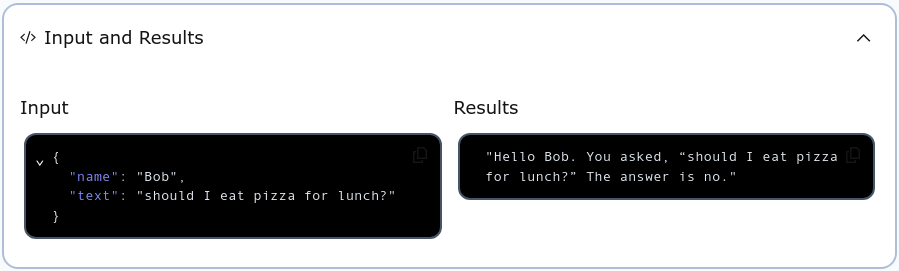
Now we can see the Activity in action. As you have done before, make sure the Temporal server is online and available, and then sbt run this program. Then open the Temporal web GUI in a browser window. Complete the “Start Workflow” form as you have done before. Be sure to enter the correct Task Queue and Workflow Type. In the Input text box, enter a JSON object that can be deserialized into the Workflow’s input type Question. For example:
{
  "name": "Bob",
  "text": "should I eat pizza for lunch?"
}
After starting the Workflow Execution and opening its page you can examine the “Input and Results” section to see your question and its hopefully correct answer.
Try the program with different questions as input, and see if it gives better advice than you would get by flipping a coin.